|
||||||||||||
|
||||||||||||
|


|
|||
|
|||
|
|
|||
|
|
|||
|

|
|||
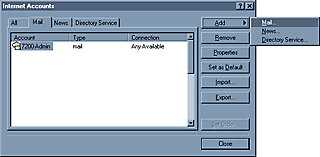
"How to set up Outlook to work with your email accounts" Open your Outlook Express and select "Tools" from menu then select "accounts" This will bring you to the internet accounts window shown below. Select the "Mail" tab then click the "Add" button and then select "Mail" to add a new E-Mail account. Please click the small window to the right that says "Mail..." to continue |
|
|||
|
"Hey!
At least they are not Medical or Insurance Forms!" |