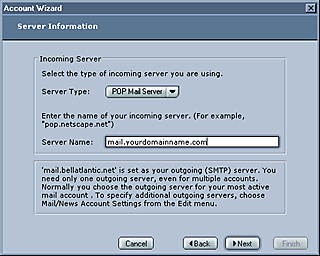
Shown Below are the
server settings used in Netscape 6. Make sure the incoming
mail "Server Type" is "POP Mail Server" as
shown below. In the Incoming mail "Server Name" field
type mail.yourdomainname.com (NOTE: yourdomainname
is your web address and if your domain name is an .org
or .net extension then you will need to use that extension instead
of the .com extension).
STILL CONFUSED? Click
Here for examples.
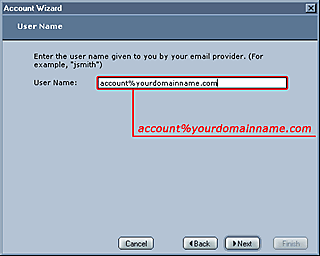
The window below
is where we enter the logon information need to access the mail
server. The "User Name" must be your entire e-mail
address as shown below, substituting the (@) symbol with the (%) symbol.
(NOTE: The "User
Name" is in this format...
user%yourdomain.com
(notice the percent [%] sign! )
Please
click on the Next button in the window below to continue.
click here to continue


