¿The Questions?

Click on any Question to get the Answer!

How do I set up Outlook Express to check my E-Mail Accounts?

How do I set up Netscape Mail to check my E-Mail Accounts?

How do I check my E-Mail Accounts using a web browser?

.


............................

Glossary Links

Click here to Browse our Glossary of Webkosmos & Internet Terms!

.

............................

Quick Jump

FAQ HOME PAGE
GLOSSARY HOME PAGE
QUICK TIPS

.

............................


¡The Answers!

"Netscape 6 Mail Client" Screen Shots

3 of 6

"How to set up Netscape 6 Mail Client to work with your email accounts"

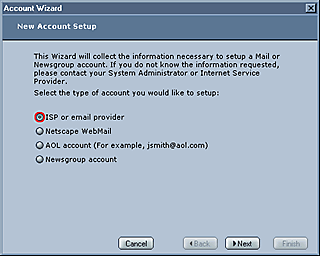
These next few windows will complete the account set-up. (This is the Account Wizard, which will simplify setting up your e-mail account.) Here you will fill out your general information including your name, email address, server names and logon information.

Make sure you choose the radio button for "ISP or email provider" and then click the "Next" button.

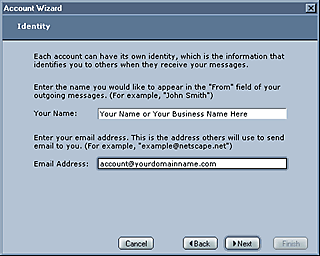
This next window is self explanatory. The name you type in will appear in the from field of the recipient's mail box, thus notifying them who it was sent from. In the "Email Address" field type your new email accounts address.

Please click on the Next button in the window below to continue.

click here to continue

......................................................

Submission Forms

"Hey! At least they are not Medical or Insurance Forms!"

Graphic Options Questionnaire:
  Designing Your Web Site
Catalog Questionnaire:
  Designing Your Photo Gallery
Webkosmos Newsletter:
  Sign Up It's Free
Got Questions?:
  Ask the Experts
Feedback:
  Your Thoughts
......................................................