¿The Questions?

Click on any Question to get the Answer!

How do I set up Outlook Express to check my E-Mail Accounts?

How do I set up Netscape Mail to check my E-Mail Accounts?

How do I check my E-Mail Accounts using a web browser?

.


............................

Glossary Links

Click here to Browse our Glossary of Webkosmos & Internet Terms!

.

............................

Quick Jump

FAQ HOME PAGE
GLOSSARY HOME PAGE
QUICK TIPS

.

............................


¡The Answers!

Accessing E-Mail Through a Web Browser

2 of 4

"How to access E-mail using Internet Explorer or Netscape Navigator"

Web Browser Access E-Mail services with IMail.

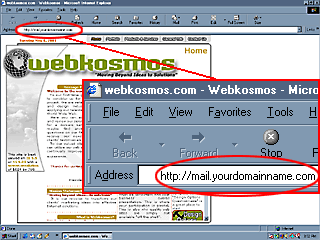
To start, launch/open your web browser (e.g., Internet Explorer or Netscape). In the address bar located near the top of the browser, as shown below, type http://mail.yourdomainname.com and then press the Enter or Return key on your keyboard to continue to the logon window.
Make sure that you have typed "Mail." instead of "www.". This is what will allow you access to your web based mail server. (NOTE: yourdomainname is your web address and if your domain name is an .org or .net extension then you will need to use that extension instead of the .com extension).
STILL CONFUSED? Click Here for examples.

Please click the red circled address to continue

click here to continue

......................................................

Submission Forms

"Hey! At least they are not Medical or Insurance Forms!"

Graphic Options Questionnaire:
  Designing Your Web Site
Catalog Questionnaire:
  Designing Your Photo Gallery
Webkosmos Newsletter:
  Sign Up It's Free
Got Questions?:
  Ask the Experts
Feedback:
  Your Thoughts
......................................................